Quick answer: WordPress can track phone number clicks by watching for clicks on tel: protocol links, either with a plugin like ClickTrace or a custom Google Tag Manager trigger. A click means someone tapped the number and their dialer opened. It does not confirm the call was answered or completed.
A few months ago, one of our web development clients asked a question we couldn't actually answer. They run a taxi service, and they wanted to know: "Is the phone number on our website even being used, or is everyone just calling the number they already have saved?"
We didn't know. We had built them a nice site, added their phone number to the header and a few service pages, and assumed it was doing its job. But assuming isn't the same as knowing.
That question is basically why ClickTrace exists now.
The Problem With Contact Forms Only
Most WordPress sites we work on lean heavily on contact forms for tracking enquiries, because forms are easy to count. Someone submits, you get an email, you log it somewhere. Simple.
Phone numbers don't work that way. Someone taps a number on their phone, it opens their dialer, and that's it. No email, no record, nothing in your dashboard. If half your business comes from people tapping the number instead of filling out a form, you're only seeing half the picture.
For a service business like a taxi company, restaurant, or trades company, phone calls are often the main way people actually book. So we built a small plugin to close that gap: ClickTrace.
What Is a tel: Link?
A tel: link is a standard HTML link that tells a phone's browser to open the dialer with a number already filled in, instead of loading a webpage. It looks like this:
<a href="tel:+441234567890">Call us</a>
On a phone, tapping that link opens the dialer with +44 1234 567890 ready to go. On a desktop without calling software installed, it usually does nothing, which is one reason phone numbers get overlooked when testing on a laptop.
Not every number on a WordPress site is set up this way. Some themes insert it as plain text, which looks clickable but isn't. To check, right click the number and look for "Copy link address." If you see a tel: address, it's real. If there's no link option, it's just text, and no plugin can track a click that never happens.
ClickTrace vs Google Tag Manager vs a General Analytics Plugin
There's more than one way to track phone clicks on WordPress. Here's how the common options compare.
| Option | Setup difficulty | Where you view data | Coding required | Best for |
|---|---|---|---|---|
| ClickTrace | Low. Install, activate, add a shortcode. | Inside your WordPress dashboard. | None for phone and email tracking. | Site owners who want an answer without leaving WordPress. |
| Google Tag Manager + GA4 | Moderate to high. You build a click trigger and a tag by hand. | GA4 reports, separate from your WordPress admin. | No custom code needed, but GTM's trigger logic takes some learning. | Teams already running GA4 for other conversion tracking. |
| General WordPress analytics plugin | Varies by plugin. Not all of them track link clicks at all. | Usually inside WordPress, sometimes an external dashboard. | None, but confirm the plugin logs tel: link clicks specifically before relying on it. | Sites already using the plugin for other stats that just need a rough number too. |
One clarification worth being precise about: GA4's Enhanced Measurement tracks outbound link clicks automatically, but Google's documentation does not list tel: links as their own automatic event. Getting phone clicks into GA4 requires setting that up yourself through Tag Manager.
What ClickTrace Does, Practically
ClickTrace tracks clicks on phone number links and email links the moment you activate it, with no setup required. You can also add custom links, like a booking button or a WhatsApp link, and give each one a name so you can tell them apart later.
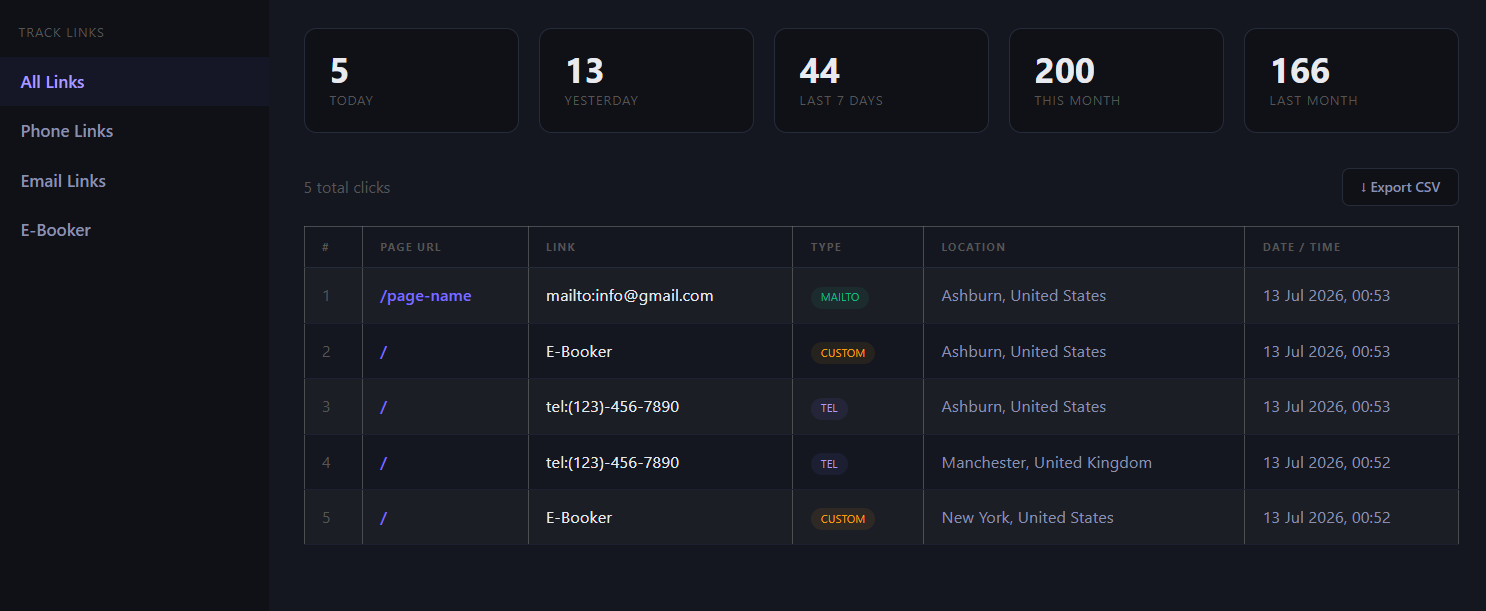
Every click gets logged with the page it happened on, roughly where the visitor was, and the time. You view it all through a simple dashboard, added to any page with a shortcode.
Setting Up ClickTrace, Step by Step
- Install the plugin. Search "ClickTrace" from Plugins, Add New inside WordPress admin, or download it from WordPress.org or our own plugins page and upload the zip file under Plugins, Add New, Upload Plugin.
- Activate it. One click, no configuration screen.
- Confirm your phone links use the tel: protocol. Check as described above. If it's plain text, fix that first, since ClickTrace can only track links that exist.
- Create or choose a page for your dashboard. Many people reuse an existing private admin page.
- Add the shortcode. Place
[clicktrace]in that page's content and update the page.
- Perform a test click while logged out. Open your site in a private or incognito browser window, not logged into WordPress, and tap the phone number.
- Confirm the event appears in the dashboard. Refresh the ClickTrace page and you should see the click logged against today's date.
That page now shows clicks for today, yesterday, the last seven days, this month, and last month, along with the percentage change month over month.
Adding Custom Links
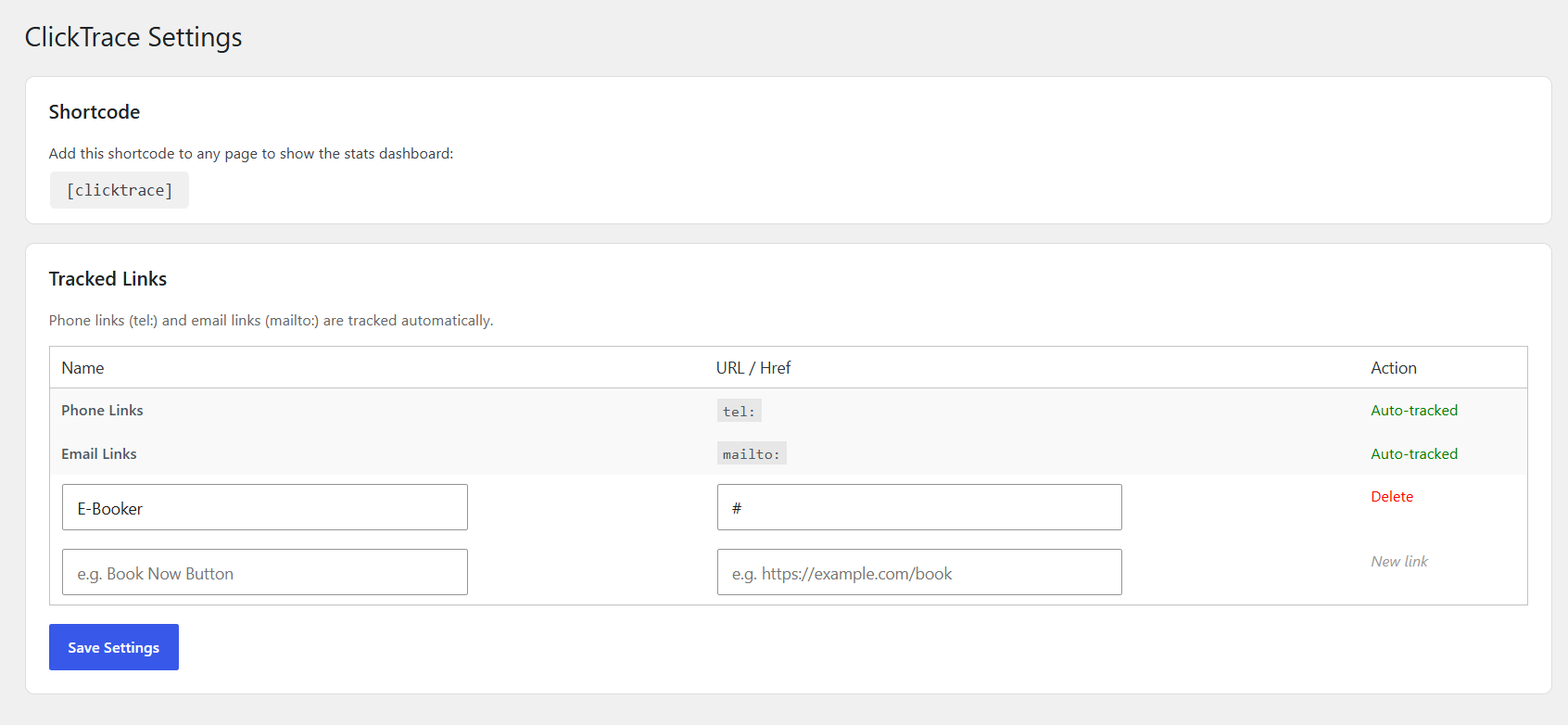
If you have a specific button you want tracked separately, like a "Book Now" link that goes to a third-party booking system, go to the ClickTrace settings page in WordPress admin. There's a simple table where you add the link's name and its exact URL. From then on, that link shows up as its own filter in the stats sidebar, separate from your general phone and email numbers.
We use this for clients running Google Ads to specific landing pages, to see whether the ad traffic actually clicks the call-to-action, not just whether they showed up.
What We Actually Learned From the Taxi Client
Once tracking was live for about three weeks, the numbers were clear: the phone number was getting clicked noticeably more than the contact form was being submitted, especially from mobile visitors in the evening. That matched what you'd expect from a taxi business, most people calling last minute rather than filling out a form and waiting for a reply.
That one data point changed how we approached the site. We made the phone number bigger and more prominent on mobile, added a sticky call button, and left the contact form for people who preferred to book in advance. Small change, but it came directly from actual data instead of a guess.
What ClickTrace Stores
Here's exactly what gets logged for each click: the page URL, which link was clicked, an approximate location at city and country level based on IP address, and a timestamp. ClickTrace does not record names, form entries, or precise GPS location.
We won't claim this makes a site automatically GDPR or CCPA compliant, because compliance depends on your full setup and privacy policy, not on any single plugin. If compliance is a requirement for your business, check with someone qualified to confirm your whole site meets it.
Troubleshooting
Clicks aren't showing up in the dashboard
Refresh the page. If it's still empty after a genuine test click, confirm the plugin is active and that the number you clicked is a real tel: link, not plain text.
The phone number isn't using the tel: protocol
This is the most common cause of "it's not working." Some themes render numbers as plain text by default. Edit the template or content so the number is wrapped in a proper tel: link.
A caching or minification plugin is interfering
Aggressive JavaScript minification can occasionally break the small script ClickTrace uses to detect clicks. Try excluding it from minification or clearing your cache and testing again.
Testing while logged in as an admin
Always test from a logged out or private browsing window. Some setups treat admin activity differently, and it's good practice to test as a real visitor would.
Click tracking is not the same as call recording
ClickTrace tells you a visitor tapped a number and their dialer opened. It does not record the call, confirm it connected, or say how long it lasted. That level of detail needs a call tracking service with dedicated tracking numbers, a different tool for a different job.
Frequently Asked Questions
Can WordPress track phone number clicks?
Yes, but not by default. WordPress doesn't track link clicks out of the box. You need a plugin like ClickTrace, or a custom Tag Manager setup, to detect and log clicks on tel: links.
Does GA4 automatically track tel: links?
No. GA4's Enhanced Measurement automatically tracks outbound link clicks to other domains, but tel: links aren't listed in Google's documentation as their own automatic event. Tracking them requires a manual Tag Manager trigger.
Does a phone click mean the call was completed?
No. A click only confirms the visitor tapped the number and their dialer opened. It doesn't confirm they dialed, that the call connected, or how long it lasted.
Can ClickTrace track WhatsApp and booking buttons?
Yes. Alongside automatic phone and email tracking, you can add any custom link, including a WhatsApp link or a booking button, and name it so it appears as its own entry in the dashboard.
Does ClickTrace work with Elementor and other page builders?
ClickTrace tracks clicks based on the link itself, not the tool used to build the page, so it works with Elementor, the block editor, and most other themes and builders, as long as the number is an actual tel: link and not plain text.
If You Want to Try It
ClickTrace is free and open for anyone to use on their own WordPress site. It's listed on WordPress.org if you'd rather install it from there. If you already have a maintenance plan with us, we can set it up as part of your next update. If you're managing your own site and want a hand getting it running, or want us to look at what the data is telling you once it's collecting, get in touch and we'll help you make sense of it.